Chaos Crew Roleplay Guide
Welcome
- [RP] is a highly customized gamemode for HL2:DM, featuring jobs, items, money, cars, houses, gangs, crime, bounties, jail, and much more!
- Read the server rules here: https://motd.chaoscrew.us
- Visit our website: https://chaoscrew.us/
- Join our Discord: https://discord.com/invite/NRXrkQZWf9
Getting Started
- Type /new in chat to learn how to enable console and ESC menus (this is necessary to play!)
- Hit ESC and select a job from the menu
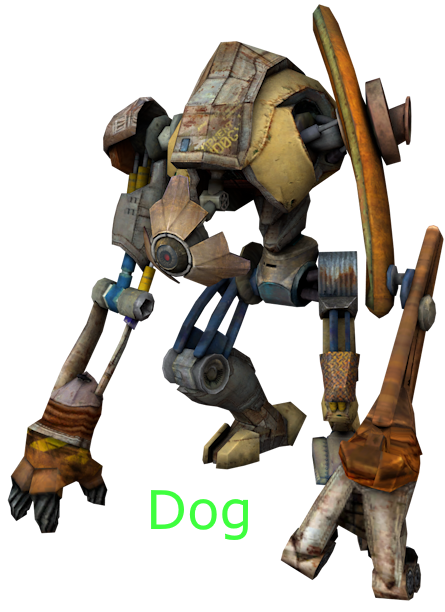
- Find a Dog NPC and press E on them to change your job
- Type /job for information about your job
- Type /guide to read this guide in-game
- Type /motd to read the server rules in-game
- Type /help to view every RP command in your console
HUD
- Your HUD (Heads Up Display) is custom text on your screen that updates every second
- Everything shown in your HUD is saved when you disconnect from the server
- Type /hudprefs to toggle the visibility of your Main HUD, Center HUD, and other HUD elements
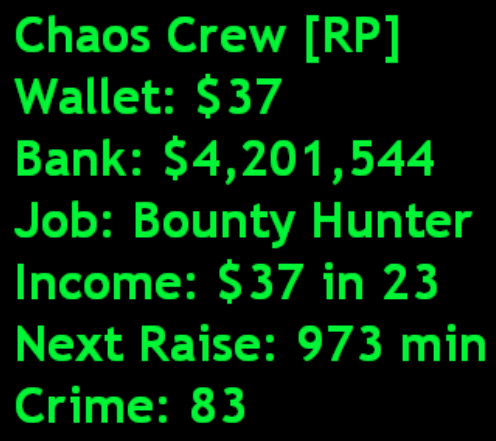
- Wallet: Money you earn, pick up, and drop on death
- Bank: Money you deposit and withdraw at Banker NPCs
- Job: Your current employment
- Income: Money you earn per minute for being online
- Next Raise: Time until your next income raise
- Crime: This number increases upon committing criminal activity
- You lose 1 crime every second
- Cops can arrest you at 800 crime
- You get a bounty at 2,500 crime
- Dying with a bounty will send you to jail
- Cops can raid your house if you have a bounty
Center HUD (middle center of your screen)
- Displays information about what you point your crosshair at
Other HUD elements (top center of your screen)
- Announcement: Robbing NPCs, bomb warnings, bounties
- No-Kill Zone: You must have under 800 crime to be protected in no-kill zones (banks and casinos)
Actions and Menus
- The default keybinds to perform actions are E, R, and SHIFT
- Edit your keybinds by pressing ESC > Options > Edit key
|
Option [needed for RP] |
Default Key |
|
Use item (buttons, machines, …) |
E |
|
Reload weapon |
R |
|
Sprint (Move Quickly) |
SHIFT |
- Press E on doors, props, players, and NPCs to interact with them
- Press ESC to view menus triggered by interactions
- Double press E on Banker NPCs to quick deposit your wallet
- Double press E on cuffed players to quick jail them as a cop
- Press SHIFT on doors and cars to lock and unlock them
- Double press SHIFT on NPCs to rob them
- Press R anywhere to open your inventory
- Press R on the front door of a house to open its menu
Jobs
|
==================== [Unemployed] 1) Hit ESC and select a job to start playing 2) Type /new if you did not enable console or ESC menus 3) Find a Dog NPC to change your job ==================== |
|
==================== [Peaceful Warrior] 1) You can't hurt rebels or cops 2) You can't be hurt by rebels unless you have crime 3) You can't spawn drug plants or money printers 4) You must have under 800 crime to select this job ==================== |
|
==================== [Chemistry Teacher] 1) Buy drug plants from Vortigaunt NPCs 2) Type /plant , /poppy , and /weed to spawn drug plants 3) Harvest drug plants when fully grown 4) Sell drug grams to Stalker NPCs 5) Bonus: +2 drug points ==================== |
|
==================== [Weed Enthusiast] 1) Buy drug plants from Vortigaunt NPCs 2) Type /plant , /poppy , and /weed to spawn drug plants 3) Harvest drug plants when fully grown 4) Sell drug grams to Stalker NPCs 5) Bonus: +$500 per 1,000 grams of weed sold ==================== |
|
==================== [Hitman] ==================== |
|
==================== [Kidnapper] ==================== |
|
==================== [Bounty Hunter] 1) Follow pink beams to find rebels with a bounty 2) Bonus: 4x the reward for capturing bounties ==================== |
|
==================== [Gangster] ==================== |
|
==================== [Hooker] ==================== |
|
==================== [Penny Picker] ==================== |
Cop
|
Apply for cop on our Discord (You must first have at least 35 in-game hours) |
|
==================== [Cop]
1218c→2exp 829c→1exp
6 exp for 16711 c 3300s $6600
kickdoor $1,000 cuff reward = 2x jail time
send AFK players you cuff to the AFK room
//need other languages for guide, spanish, russian ==================== |
Unique NPCs
|
Dog (Employer) |
Access the job menu Change cop rank |
|
Gman (Banker) |
Access the bank menu |
|
Breen (Taxi) |
Access the taxi menu |
|
Stalker (Drug Buyer) |
Buys drug grams |
|
Metrocop (Officer) |
Cop resupply |
Vendor NPCs
|
Cheaple |
Sells raffle tickets, dice, and crate keys |
|
Vortigaunt |
Sells drug plants, and money printers |
|
Slave Vortigaunt |
Sells VIP items |
|
Grigori |
Sells weapons and ammo |
|
Odessa |
Sells more weapons and ammo |
|
Kleiner |
Sells medkits and suit |
|
Headcrab |
Sells player skins |
|
Poison Headcrab |
Sells locks and lockbreakers |
|
Poison Zombie |
Sells cuffsaws |
|
Fast Zombie |
Sells doorhacks |
|
Zombie |
Sells lockpicks |
|
Eli |
Sells bugs, scanners, and jammers |
|
Mossman |
Sells HUD colors |
|
Alyx |
Sells food |
|
Barney |
Sells alcohol |
|
Ichthyosaur |
Sells drugs |
|
Mortar & Crab Synth |
Sells trails |
|
Antlions |
Sells props |
|
Antlion Guard & Loader |
Sells event props |
Useful Commands
Printing
/print = Spawns a money printer
/microprint = Spawns a micro money printer
/megaprint = Spawns a mega money printer
Planting
/plant = Spawns a cactus plant
/weed = Spawns a weed plant
/poppy = Spawns a poppy plant
Houses (you can only own 1 house!)
/door = Use on a door to view the names of online keyholders
/locks = Use on a door to view its amount of locks
/ buydoor = Buys a house if looking at the front door
/ selldoor = Sells a house you own if looking at the front door
/givekeys <#> <player> = Give door keys #1-50 to other players
/takekeys <#> = Take door keys #1-50
/mydoormess <message> = Use on a door you own to change its message
/refunddoor = Get refunded for your house on the previous map if you did not sell it
Bank
/withdraw <amount> = Withdraws money at a Banker NPC
/deposit <amount> = Deposits money at a Banker NPC
Jail
/ freedomcard = Use 1 Freedom Card to be released from jail
Casino
/bet <type> <amount> = Betting Types: red, black, odd, even, 1-12, 13-24, 25-36, 1-18, 19-36, or any number (ex. 20 [1 to 37 chance])
Cars
/cars = View the car menu to buy and spawn cars (Buggy costs $200,000)
/storecar = Stores your car after 5 seconds
/mycarmess = Changes the message on your car
Miscellaneous
/stats = Displays your player statistics
/ rprank = Displays your rank in money and hours spent online compared to other online players
/rtd = Roll the dice for a random result, buy dice from Citizen NPCs
/flip <player> <amount> = Coinflip bet against another player; both players must be carrying the bet amount in their wallets
/help = View a list of every command in your console
+/-jetpack = Jetpack on/off (VIP)
+/-parachute = Parachute on/off (VIP)
RP Binds
- Read about binding here
- You can use your console to bind any RP command to any key (convenient for spawning weapons, plants, etc.)
- Replace the [ / ] in front of a command with [ sm_ ] to use it in your console ( /items = sm_items )
- Copy and paste lines from down below into your console to create command binds and inventory item binds
Command binds
bind x "say hello" // Pressing x enters hello in chat
unbind x // Clears x of all binds
bind y "say /items" // Pressing y opens your inventory
bind y "sm_items" // Same as above
Item binds
sm_vmenuselect # // Selects option ( 1-8 ) in any ESC menu (numbers correspond with menu options )
- Copy and paste multiple [ sm_vmenuselect # ] to automatically input combinations of menu option selections
- Separate multiple commands with semicolons (;)
- Encase entire strings of commands in double quotes (")
- Combine this with [ sm_items ] to bind an item's automatic usage or spawning
bind z "sm_items; sm_vmenuselect # ; sm_vmenuselect # ; sm_vmenuselect # "
- Item binds follow this command format (if the item is on the first page of your inventory)
- For binding items on an inventory page other than the first, copy and paste [ sm_vmenuselect 7; ] in front
of [ bind z "sm_items; ] to select the next inventory page (paste it for however many pages you want to skip)
- Replace # with menu options written down below
bind z "sm_items; // Pressing z opens your inventory
sm_vmenuselect # ; // Item Page 1-5
sm_vmenuselect # ; // Item Name 1-5
sm_vmenuselect # ;" // Item Options 1-5